Introducing FTL: A new operating system for clouds
2026-09-14
This year, I’ve been working on a new lightweight and flexible operating system project called FTL (codename), aiming to be a practical OS for cloud computing, not just another hobby OS.
It is very ambitious, and is still in very alpha quality, but it started working. Here is a screenshot of a Linux simple HTTP server running on FTL.
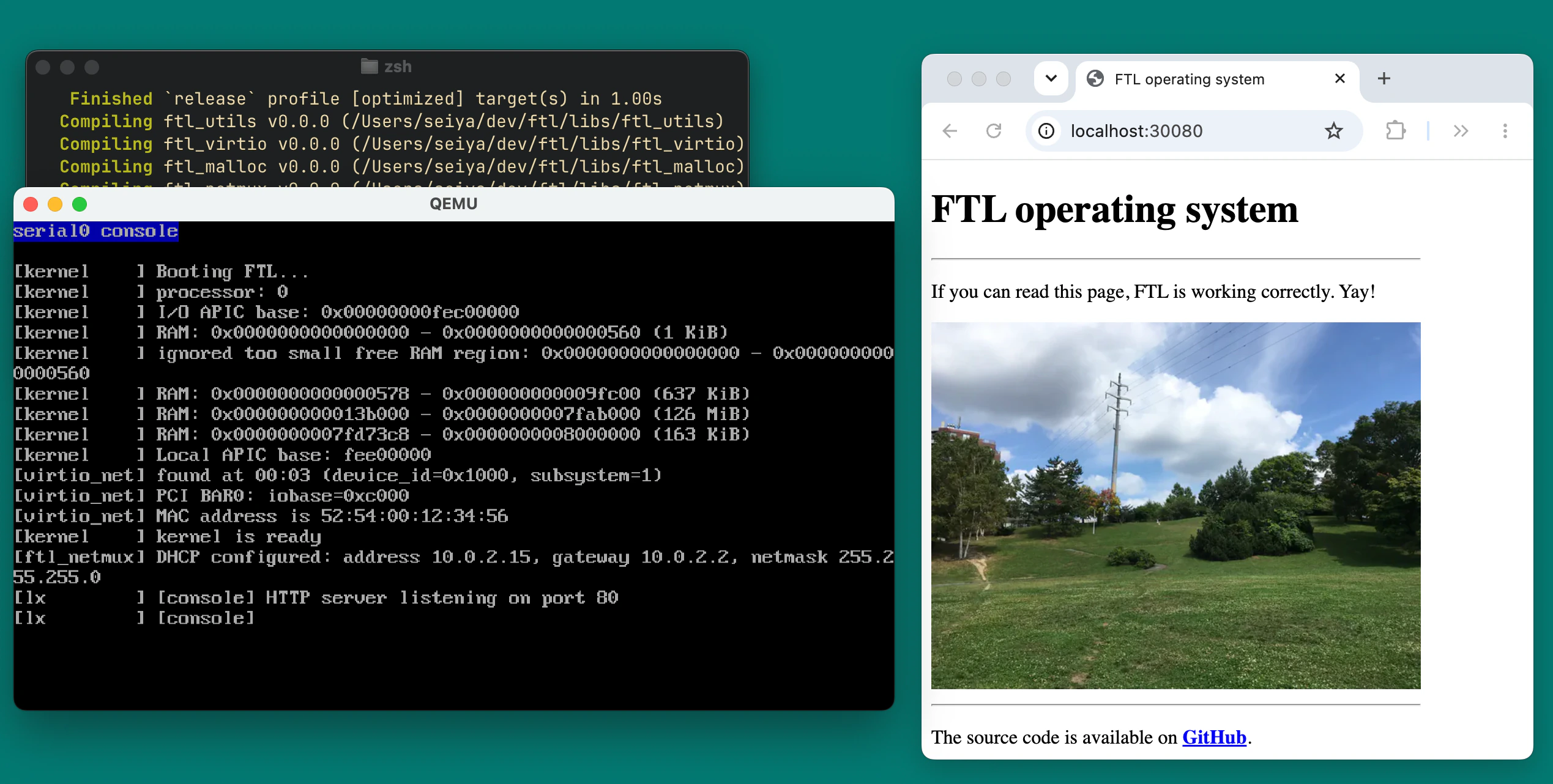
You can try FTL locally on QEMU:
git clone https://github.com/nuta/ftl
cd ftl && ./run.sh
You can also to see it in action on Google Compute Engine. Visit ftl-os.org to say hi to FTL!
Why new OS?
Traditional monolithic (or modular) kernels, especially Linux, is a popular choice for cloud environments like AWS EC2. It is mature and keeps evolving beyond a tranditional design.
So we already have Linux, a mature and battle-tested kernel. However, the current monolithic kernel design unnecessarily restricts the software architecture you can build.
In monolithic design, the kernel is a big binary with many features which is hard to approach by application developers. eBPF made it easier to extend the kernel, but it is still limited and requires deep kernel knowledge to write. I want an OS that is easy to extend and try new ideas safely.
Also, designing an operating system is very exciting. Super exciting! You rethink the software stack from scratch. You define how programs run, and how people interact with them. Since Linux was started in 90s, OS research community has been exploring new ideas such as Multikernel, Unikernel, and more.
My question is what if we design a pragmatic kernel from scratch, inheriting the best ideas we have today? That’s what I’m trying to do with FTL.
Introducing FTL
FTL is a new hybrid kernel based operating system to allow you to maximize the flexibility of your software architecture. With, FTL you can:
- Run your Linux binaries (Linux binary compatible).
- Run a dedicated application kernel per container.
- Isolate containers with a stronger security boundary, without hardware-assisted virtualization.
- Run Unikernel-like applications without POSIX abstraction.
- Try experimental concepts like io_uring, add observability hooks, or implement a custom TCP stack safely, without sudo / kernel programming.
- Update the userspace OS without restarting the machine. Each container can run different OS/application kernel versions.
The core idea is to have an “userspace OS” library which behaves just like shared libraries, and implement the most of OS concepts in it. The kernel focues on providing a minimal interface to it:
               FTL                             Linux
┌────────────────────────────┐   ┌──────────────────────────────┐
│┏━━━━━━━━━━━┓  ┏━━━━━━━━━━━┓│   │┏━━━━━━━━━━━━┓  ┏━━━━━━━━━━━━┓│
│┃           ┃  ┃           ┃│   │┃            ┃  ┃            ┃│
│┃  Linux    ┃  ┃   Linux   ┃│   │┃   Linux    ┃  ┃   Linux    ┃│
│┃ Process   ┃  ┃  Process  ┃│   │┃  Process   ┃  ┃  Process   ┃│
│┃           ┃  ┃           ┃│   │┃            ┃  ┃            ┃│
│┃╌╌╌╌╌╌╌╌ Linux ABI ╌╌╌╌╌╌╌┃│   │┗━━━━━━━━━━━━┛  ┗━━━━━━━━━━━━┛│
│┃       Userspace OS       ┃│   └──────────────────────────────┘
│┃ (Process, VFS, TCP, ...) ┃│ ┌╌╌╌╌╌╌╌ Linux system calls ╌╌╌╌╌╌
│┗━━━━━━━━━━━━━━━━━━━━━━━━━━┛│ ╎ ╔══════════════════════════════╗
└────────────────────────────┘ ╎ ║            Kernel            ║
╌╌╌╌╌╌ minimal interface ╌╌╌╌╌╌┘ ║                              ║
╔════════════════════════════╗   ║  process, fork/exec, memory, ║
║           Kernel           ║   ║  fork/exec, signals, TCP/IP, ║
║ vCPU, memory, drivers, ... ║   ║   /proc, /dev, drivers ...   ║
╚════════════════════════════╝   ╚══════════════════════════════╝
It is initially started in a microkernel design, and I changed the architecture quite a bit, but the direction is still the same: move things to userspace.
Userspace OS design
Userspace OS is the library that implements the OS concepts in the userspace. It is similar to application kernel (Sentry) in gVisor. It intercepts system calls and provides OS environment like Linux, on top of minimal kernel interface.
gVisor also does system call interception for the sake of strong isolation, but more importantly, it enables you to extend most of Linux kernel features without kernel programming. You can easily add printfs, apply security updates, or try a new feature quickly. In FTL, OS is just a library.
You can have different userspace OS for each container. For example, userspace OS may implement a custom TCP stack. To update userspace OS, you just need to restart the container with new library.
In other words, become an OS developer with FTL!
Linux binary compatibility
FTL supports running Linux binaries as is. In the future, you’ll be also able to run your Docker images as is too.
Each Linux container runs its own userspace OS instance. It is mapped to the userspace in all processes, and implements Linux concepts like process, PID, fork, virtual file system, sockets, etc.
Like FreeBSD’s Linux compatibility layer, Linux userspace OS is optional. It is just one of userspace OSes. You can build another userspace OS for FreeBSD, or even a unikernel-like application built on top of FTL’s hypervisor-like interface. OS is just a shared library!
Kernel designed like a hypervisor
I mentioned that FTL has a hybrid kernel, but technically it is an Exokernel. The kernel focues on hardware resource multiplexing such as CPU/memory/disk/networking, and move things to library OS.
FTL kernel works like a hypervisor. It provides a minimal interface, and aims to provide a strong isolation boundary. The key difference from hypervisors is that FTL kernel is built on the user mode (so-called process isolation), not hardware-assited virtualization which requires metal instances for performance.
I wrote previously that hypervisor is essentially a hardware-assisted catch block. It still applies to FTL kernel. FTL’s isolation is hardware-assisted by user mode (so-called ring 3) instead of Intel VT-x. The user mode is considered as less secure in traditional OS, but FTL tries to turn it into a strong isolation boundary by minimizing the kernel interface like hypervisors do.
In short, FTL aims to make containers secure and well-isolated like virtual machines.
To be fair, this userspace OS design has a drawback that processes in the same container can interfere the OS itself, because it is just a shared library. This means some applications that rely on process isolation (e.g. Chromium) would need some work to isolate components securely on FTL.
In the future, we could leverage in-process isolation mechanisms like Intel MPK to protect userspace OS from applications.
Today, FTL kernel provides primitives such as vCPU (thread), handle space (file descriptor table),virtual address space, virtual memory objects, and virtual network interface. It works in 2MB RAM on x86-64 QEMU. As of this writing, the kernel binary is 100KB large. It’s entirely written in Rust by the way.
Oh! The kernel also has interesting design details like single kernel stack, OOM handling in Rust, “rust-lang libraries only” dependencies policy, … but I’ll save it for another time.
In-kernel device drivers in “Hard Mode Rust”
Device drivers (currently virtio-net) are currently embedded in the kernel. This is the major disadvantage compared to the original microkernel design. Instead, FTL device drivers are written in Hard Mode Rust, to run device drivers safely to some extent by leveraging Rust’s safety.
Hard Mode means that you split your program into std binary and
#![no_std]no-alloc library. Only the small binary is allowed to directly ask OS for resources.
This is also known as “sans-io” design. In FTL, device drivers are #[no_std] library without implicit dynamic allocations. FTL kernel passes env, an explicit I/O interface à la Zig’s explicit Io interface, to drivers. It allows FTL to track its resource usage, turns drivers into sans-io, and make it unit-testable.
That being said, it is not perfect. For example, panic safety is not guaranteed since Rust compiler does not provide a way to reject implicit panics hidden in dependencies. As Rust compiler evolves, FTL will adopt its new abilities to catch issues at compile time. The device driver isolation aims to be good enough, not strictly safe.
What’s working now?
Today, it can run a simple HTTP server (Linux binary) on Google Compute Engine.
Linux compatibility layer implements system calls such as read, write, fork, execve, wait4, listen, accept, exit_group, and poll. It is good enough to run a musl-based simple Linux binaries.
What’s next?
I’m currently working on running modern software like tokio-based async Rust applications, and eventually Node.js by December this year. Linux container images support too. The goal of FTL is to be a drop-in replacement for Linux in clouds.
FTL is still in early development. It lacks disk support, efficient copy-on-write fork(2), /proc filesystem, TTY support, and more. That being said, this toy started working and is already fun to play with.
To try it out, clone the Git repo and just run ./run.sh. If you’re intested in this project, share you questions/ideas on GitHub Discussions or email me :)